Webinar: May 27th 1PM ET: National Park Service – NPS.gov Media Player: An Accessible Option for All Government

May 27, 2025 – The NPS.gov Media Player: An Accessible Option for All Government

Section 508 Best Practices The NPS.gov Media Player: An Accessible Option for All Government

Tuesday, May 27th 1:00 PM – 2:30 PM Eastern Time Zone

REGISTER FOR SESSION: https://accessibilityonline.org/cioc-508/schedule/login?r=session_members

Description

The Revised Section 508 Standards include a requirement (503.4) where a digital product displays video with synchronized audio, the product shall provide user controls for closed captions and audio descriptions at the same menu level as the user controls for volume or program selection. The National Park Service (NPS) within the Department of the Interior (DOI) has developed an open-source media player which conforms with the Revised Section 508 Standard for user controls by ensuring that the caption control (CC) and audio description control (AD) buttons are visible along-side the other user controls.

Over several years, the National Park Service has customized a media player which aims to be as accessible as possible. It supports multi-track audio and video, allowing a user to toggle between standard, described, and American Sign Language versions of a single video; it supports captioning in over 10 languages; and has been through several rounds of user testing with people who are blind / low vision. The code for this player is available on GitHub.

Questions can be submitted in advance of the session or can be posed during the live webinar.

Video Remote Interpreting (VRI) and real-time captioning will be provided.

Continuing Education Recognition Available
Certificate Credit hours:
ACTCP 1.5 hours
Certificate of Attendance 1.5 hours

Speakers:
Alex Lindeman, IT Specialist, Section 508 Program Coordinator, National Park Service

Sid Sharma, Section 508 Program Manager, Department of the Interior

Questions for presenters:

  1. 1. You say the media player complies with Section 508, which means it is conformant with WCAG 2.0 AA. Does it meet any of the additional WCAG 2.1 and 2.2 success criteria? 2. Can you please share the link to the project on GitHub, ideally before the webinar. I have searched for it but cannot find it.
  2. Is the media player available for others to use, such as non-profit organizations?
  3. Is the media player available for others to use, such as non-profit organizations?

Privacy Statement

In order to register for this webinar you will need to create an account and provide, at a minimum, your name, email address, phone number, city, and country. If you do not wish to create an account, you may watch this webinar after it has been recorded. Webinars are typically posted 2 days after the live session. You can access our previously recorded webinars at this link. Be advised that in order to obtain continuing education credits you must register and create an account. See Continuing Education Recognition Request Policy.

REGISTER FOR SESSION: https://accessibilityonline.org/cioc-508/schedule/login?r=session_members

May 28th 2PM ET – Beyond the Minimums – Accessibility Webinar Series Part 2: Disability Awareness Panel: Thoughtfully Supporting the Needs of Individuals with Disabilities in Your Programs and Services

May 28, 2025 2:00-3:15 PM (Eastern Time)

Beyond the Minimums – Accessibility Webinar Series Part 2: Disability Awareness Panel: Thoughtfully Supporting the Needs of Individuals with Disabilities in Your Programs and Services

Register today!

https://education.playcore.com/p/ada-part-2-live

People of all ages and abilities have the fundamental right to access the benefits of quality parks and recreation. This panel will feature disability advocates, parks and recreation professionals, and accessibility experts who will share their perspectives and create awareness about common barriers to inclusion. Gain insightful strategies and considerations to help ensure facilities, programs, and services are designed to create a positive, welcoming environment, and staff can confidently welcome individuals with disabilities and strengthen community connections.

This is the second session of a four-part webinar series, Beyond the Minimums. This webinar includes real-time captioning. Video remote interpreting (VRI) provided upon request. To request video interpreting services and/or resources in an alternate format, please email core@playcore.com at least two weeks before the live webinar date.

Learning Objectives:

  1. List three disability awareness tips and considerations when communicating and interacting with individuals with disabilities.
  2. Describe best practices for communicating and promoting inclusive play and recreation opportunities through accessible digital, printed, and in-person accommodations.
  3. Outline key strategies for planning and implementing inclusive programs, services, and events that foster belonging and equity.
  4. Evaluate your current programs and services to identify priorities and areas of need.

Session Date: May 28, 2025
Session Time: 2:00 PM (Eastern Time)

Register for this webinar today!

Webinar: April 9 @ 2PM – People with Disabilities – Empower Your Business with ABLE Account (Achieving a Better Life Experience)


Empower Your Business with ABLE (Achieving a Better Life Experience)
Wednesday, April 9, 2025 from 2-3 PM ET
National Disability Institute (NDI) Small Business Hub and the ABLE National Resource Center webinar, Empower Your Business with ABLE, on Wednesday, April 9, 2025, from 2:00–3:00 PM ET. 
Entrepreneurs and small business owners with disabilities face unique financial challenges and ABLE accounts can be a game-changer. This session will explore how ABLE accounts support business owners in 2025 and beyond, helping you maximize financial security while maintaining essential benefits. 

Register

Topics Include:
✅ ABLE account eligibility
✅ ABLE Plan features
✅ Contributions & the ABLE to Work provision
✅ Work-Related Qualified Disability Expenses
✅ How ABLE can serve as a financial resource for employees

Register

Please note: ASL Interpretation and Captioning will be provided. To make a reasonable accommodation request, or if you have questions about this session, please email Alexis Jones at ajones@ndi-inc.org. Please allow at least 3-5 business days’ advance notice; last-minute requests will be accepted though may not be possible to fulfill.

All personal data will be kept confidential, and we will not share individual demographic data with any third party. National Disability Institute (NDI) collects data to help secure future funding to create programs that serve the community.

PHOTO: Dark teal graphic with white text reading: Empower Your Business with ABLE. Wednesday, April 9. 2:00-3:00 PM ET. Register now. The NDI, Small Business Hub and ABLE NRC logos are in the top left corner. On the right side of the graphic is a photo of a woman sitting at a desk, writing in a notebook wearing earbuds and a light brown sweater, smiling at the camera.

Apr 9, 2025 02:00 PM Eastern Time
REGISTER:
https://us02web.zoom.us/meeting/register/CaokqaOGRU2Lb_7q1ctOCw#/registration

The contents of this webinar were developed under a grant from the U.S. Department of Education (Department). The Department does not mandate or prescribe practices, models, or other activities described or discussed in this document. The contents of this webinar may contain examples of, adaptations of, and links to resources created and maintained by another public or private organization. The Department does not control or guarantee the accuracy, relevance, timeliness, or completeness of this outside information. The content of this webinar does not necessarily represent the policy of the Department. This publication is not intended to represent the views or policy of or be an endorsement of any views expressed of any views expressed or materials provided by any Federal agency.

Additional Background Information:
An ABLE (Achieving a Better Life Experience) account is a savings and / or investment option for people with disabilities who qualify. It falls under Section 529A of the Internal Revenue Service tax code. The ABLE Act allows a person whose disability began before age 26*, to save money in the ABLE account without affecting most federally funded benefits based on need. The money in the account may be used to pay for qualified disability expenses (QDEs). Any growth in the account from investments is not taxed and does not count as income if the funds are used for QDEs.
View a 20-minute ABLE Basics video on ABLE NRC’s YouTube channel.
*The disability onset age is expanding to age 46 effective January 1, 2026.

March 26, 2025, 3–4:30 p.m. ET – Free Webinar: Ticket to Work & Plan to Achieve Self-Support for people ages 18-64 receiving Social Security Disability benefits (SSDI/SSI)

Free Webinar: Ticket to Work and the Plan to Achieve Self-Support

March 26, 2025, 3 – 4:30 p.m. ET

Join the next Work Incentives Seminar Event (WISE) webinar on March 26 at 3 p.m. ET to learn how a Plan to Achieve Self-Support (PASS) may help you set aside money to achieve your approved work goals.

During the webinar, we will answer questions like:

  • What is Social Security’s Ticket to Work Program?
  • What is a PASS?
  • Who can help you write your PASS?

Register Now

Online: choosework.ssa.gov/wise

By Phone: 1-866-968-7842 or 1-866-833-2967 (TTY device for individuals who are deaf, hard of hearing, or who have a speech disability).

You will receive a registration confirmation message with instructions on how to log in to the webinar. Please be sure to check your spam folder.

WISE in American Sign Language (ASL)ASL Guide can help individuals who are deaf or hard of hearing access monthly WISE webinars using Video Relay Service (VRS).

Additional accessibility information is available on the registration page.

Questions about Ticket to Work?

The Ticket Program supports career development for people ages 18 through 64 who receive Social Security Disability benefits (SSDI/SSI) and want to work. Monthly WISE webinars provide information about Social Security programs, Work Incentives, and other resources that may help you or someone you know on the path to financial independence through work.

Email us: TicketToWork@ssa.gov

Call: 1-866-968-7842 or 1-866-833-2967 (TTY device for individuals who are deaf, hard of hearing, or who have a speech disability).

Visit website: choosework.ssa.gov

Change, Not Charity premieres on PBS tomorrow, March 25 – The Americans with Disabilities Act – on American Experience


Change, Not Charity premieres on PBS tomorrow, March 25

  • Change, Not Charity premieres on PBS tomorrow, March 25.   
  • Tells the emotional and dramatic story of the decades-long push for equality and accessibility that culminated in the passage of the Americans with Disabilities Act (ADA) in 1990.
  • While curb cuts, ramps at building entrances, and braille on elevator buttons seem commonplace today, they were once the subject of a pitched battle that landed on the steps of Congress. Told through the voices of key participants and witnesses, the film highlights the determined people who literally put their bodies on the line to achieve their goal and change the lives of all Americans.
  • A story of courage and perseverance, the film brings to life one of the great civil rights movements in American history, where ordinary people made their voices heard and Congress responded. A testament to the power of coalition building and bipartisan compromise, the passage of the ADA is a shining example of democracy in action.

March 19 – 1PM Disabilities & Disasters – Emergency Preparedness Webinar

March 19

Disabilities and Disasters
Emergency Preparedness Webinar

Registration is now open!

Mar 19, 2025 01:00 PM in Eastern Time

The Pacific ADA Center is hosting a free webinar to livestream Disabilities and Disasters, an event put on by our research partners at New York University’s Complex Public Health Disasters Lab.

The event will feature:

Presentation about resilience and preparedness

Data from Pacific region residents with disabilities about experiences during emergencies

Overview of the Pacific ADA Center’s work with the California Governor’s Office of Emergency Services (OES) to increase accessibility at emergency shelter sites

Panel of people with disabilities to share their experiences and insight into emergency preparedness

REGISTER: https://us02web.zoom.us/webinar/register/WN_zehxNhOAReai5yvyRzxdpQ#/registration

Stream Live Online 10am-11:30am March 4th DD Awareness Day Program – Ohio Statehouse

MARCH 4th 2025 Developmental Disabilities Awareness & Advocacy Day 

March is National Developmental Disability Awareness Month. Hundreds of advocates are coming to the Ohio Statehouse on March 4, 2025 to inform & educate on issues important to Ohioans with developmental disabilities.

TWO WAYS TO WATCH THE PROGRAM LIVE ONLINE:

https://ddohio.wordpress.com

https://ohiochannel.org

agenda: march 4, 2025 Developmental Disabilities Awareness & Advocacy Day – Speakers are subject to change:

PROGRAM

9:30 a.m.       Pre-Event Music by Zayne Harshaw

10:00 a.m.    DD Awareness & Advocacy Day Presentation

Welcome/Introductions • Shari Cooper, Event Emcee

A Message from Ohio’s Governor • Mike DeWine

Transportation Panel • Moderated by Mark Seifarth

Panelists: Ben Ziff, Davey McNelly, Tammy Baker

Remarks • Ohio Department of Developmental Disabilities Director Kim Hauck

Keynote Message • Former Ohio State Rep. Scott Lipps
Insights into Advocacy

Farewell • Shari Cooper

Closing Music • Zayne Harshaw

OOD Hosts Workplace Inclusion Webinar Series Supporting Ohioans with Disabilities

(COLUMBUS, OH)—Ohio Governor Mike DeWine and Opportunities for Ohioans with Disabilities (OOD) Director Kevin L. Miller announced OOD’s new webinar series for 2025, which aims to foster both community and workplace inclusion for Ohioans with disabilities.

“Everyone has a role to play in making sure people with disabilities are welcomed and supported in our communities and workplaces,” said Governor DeWine. “This year’s webinar series is another step forward in our ongoing efforts in Ohio to promote inclusion and accessibility, and to empower all people to reach their full, God-given potential.”

“We invite you to join us for valuable insights on how to create communities and workplaces that are not only accessible but also embrace individuals with disabilities,” said Director Miller. “The series culminates with three webinars designed to equip employers with the tools they need to foster disability-inclusive workplaces.”

Webinar Schedule

  • January 15: Accessible Communications
  • February 19: Website Accessibility
  • March 19: Utilizing ADA Tools
  • April 17: All About Service Animals
  • May 21: Technology in the Workplace
  • June 18: Safety and Emergency Management
  • July 16: All About Sensory Inclusion
  • September 17: Disability-Inclusive Workplaces: Inclusive Leadership
  • October 22: Disability-Inclusive Workplaces: Attracting Diverse Talent
  • November 20: Disability-Inclusive Workplaces: Retaining Diverse Talent

All webinars begin at 10 a.m. and will be Microsoft Teams webinars.

LINK TO REGISTER FOR WEBINARS: https://ood.ohio.gov/information-for-employers/employer-events/all-events

Each webinar will be recorded and archived for future viewing. More information and registration links to all upcoming webinars can be found at Employer Events. People who participate in these webinars can earn professional development credits. More information is included below.

The no-cost webinar series marks the latest example of the administration’s commitment to making Ohio a national leader in accessibility.

Moments after taking the oath of office, one of Governor DeWine’s first actions was signing an executive order establishing Ohio as a Disability Inclusion State and Model Employer of Individuals with Disabilities.

Under Governor DeWine’s leadership, OOD also launched Accessible Ohio. Through this initiative, Accessible Ohio Specialists work directly with communities, businesses, and other local partners to identify opportunities to enhance accessibility.

Accessible Ohio is one of many ways OOD supports and promotes businesses that prioritize inclusivity. OOD offers a bevy of information for employers, including an Inclusive Employer Toolkit designed to help employers recruit, hire, and retain employees with disabilities and foster an inclusive workplace.

OOD also recently awarded its annual Governor’s Inclusive Employer Award, which serves as an opportunity to spotlight businesses in Ohio that go above and beyond in supporting individuals with disabilities in the workplace.

Webinar Credit Information

HRCI 2025 logo recertification provider.Each webinar has been approved for 1.00 HR (General) re-certification credit hour toward aPHR™, aPHRi™, PHR®, PHRca®, SPHR®, GPHR®, PHRi™ and SPHRi™ re-certification through HR Certification Institute® (HRCI®) and 1.00 SHRM Professional Development Credit (PDC) hour toward SHRM-CP® or SHRM-SCP®. While this training is not pre-approved for CESP Continuing Education (CE) credit, it aligns with CESP content, and verification of attendance will be provided upon request. These credits are available for attendees of the live broadcast.

NOON TODAY: National Trends in Disability Employment (or nTIDE) Lunch & Learn series 12/06/24

REGISTER: https://unh.zoom.us/webinar/register/WN_Lz_sZg77TGuMCNXhofsSxQ#/registration

Free | Online | Contact

National Trends in Disability Employment (or nTIDE) Lunch & Learn series — first Friday of every month, corresponding with the Bureau of Labor Statistics jobs report — live broadcast via Zoom Webinar to share the results of the latest nTIDE — Plus news and updates from the field of Disability Employment, as well as host an invited panelist who will discuss current disability related findings and events.

  • 12:00 pm: Introduction & Welcome
    Andrew Houtenville, University of New Hampshire
  • 12:10 pm: Overview of National Trends in Disability Employment (nTIDE) Jobs Report
    • Release John O’Neill, Kessler Foundation
    • The Numbers Andrew Houtenville, University of New Hampshire
  • 12:15 pm: Announcements from the field of Disability Employment
    Denise Rozell, Director of Policy Innovation, AUCD
  • 12:30 pm: Guest Presenters
  • 12:45 pm: Open Question & Answer period for attendees

Note. All webinars will be recorded and closed captioned and will be added to our website archives along with full transcripts following the live broadcast.

REGISTER: https://unh.zoom.us/webinar/register/WN_Lz_sZg77TGuMCNXhofsSxQ#/registration

Presenters

Andrew Houtenville is a man with very short gray hair and beard in a brown suit

Andrew Houtenville, PhD, is a Professor of Economics and Research Director of the Institute on Disability at the University of New Hampshire. Dr. Houtenville is extensively involved in disability statistics and employment policy research. He has published widely in the areas of disability statistics and the economic status of people with disabilities. He is the Principal Investigator on the NIDILRR-funded Employment Policy and Measurement Rehabilitation and Research Training Center. Dr. Houtenville received his Ph.D. in Economics from the University of New Hampshire in 1999 & was a National Institute on Aging Post-Doctoral Fellow at Syracuse University in 1998/1999.

John O'Neill is a man with short gray hair and round glasses, wearing a suit and tie.

John O’Neill, PhD is the director of employment and disability research at Kessler Foundation and has over 28 years of experience in vocational rehabilitation as a rehabilitation counselor educator, disability employment researcher, and advisor to state vocational rehabilitation agencies. Dr. O’Neill has been a PI or co-PI on six NIDILRR funded, five-year research and training centers focusing on TBI and community integration, disability statistics, disability employment service system, and how individual and contextual factors relate to employment outcomes among people with disabilities.

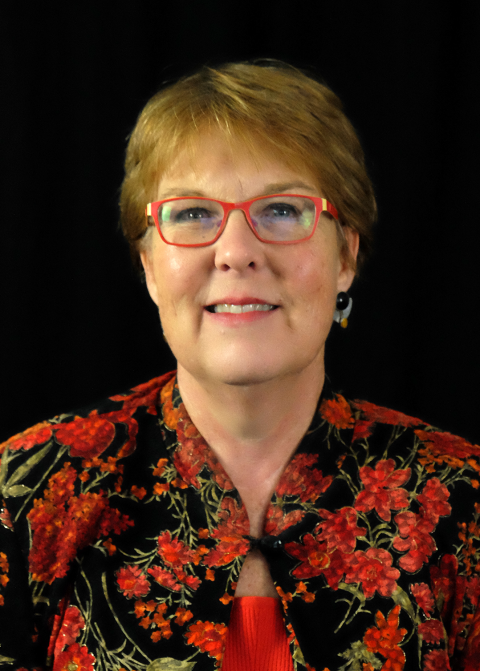
Denise Rozell is a woman with short reddish blond hair and red glasses

Denise M. Rozell, JD is the Director of Policy Innovation at the AUCD. Prior to joining AUCD, she spent fifteen years as Assistant Vice President for State Government Relations with Easter Seals. Denise was the primary resource to Easter Seals 75 affiliates in building capacity to increase awareness of and support for Easter Seals in state government. Prior to that, Denise was the Executive Director of the Association for Education and Rehabilitation of the Blind and Visually Impaired, an international membership organization for the professionals serving individuals who are blind or visually impaired. Denise holds a bachelor’s degree in political science from Occidental College in Los Angeles and a juris doctorate from Boalt Hall School of Law at the University of California in Berkeley.

OHIO Accessible Early Voting Through November 3rd & Accessible Voting on Election Day November 5th

EARLY IN-PERSON VOTING HOURS REMAINING FOR OCTOBER & NOVEMBER October 30 – November 1: 7:30 a.m. – 7:30 p.m.

November 2: 8:00 a.m. – 4:00 p.m.

November 3: 1:00 p.m. – 5:00 p.m.

I voted early in Franklin County in Ohio. Signage was easy to see for curbside voting and used the International accessibility symbol

From Ohio Secretary of State Website on Accessible Early In-Person and Curbside Voting: https://www.ohiosos.gov/elections/voters/voters-with-disabilities/early-voting/

Curbside Voting

Ohio voters with disabilities can vote curbside if they are physically unable to enter their early voting location. With curbside voting, two poll workers from opposite major political parties bring out a ballot, and voters have the option to sit in their vehicle to vote or vote at the door of the early voting location.

If early voting, arrangements must be made to vote curbside at the early voting location prior to arrival.

To get more information about curbside voting, contact your county board of elections.

Accessible Voting on Election Day

Tuesday, November 5: General Election: Polls are open from 6:30 a.m. – 7:30 p.m.

Accessible Voting on Election Day From Ohio Secretary of State – November 5: General Election: Polls are open from 6:30 a.m. – 7:30 p.m.

Here are accessible voting options for Ohio voters with disabilities on Election Day.

Voting In Person

In Ohio, every polling location is required to be accessible to ensure equal access for people with disabilities. Polling locations are required to have accessible voting equipment available, setup, and ready for voters to mark their ballot privately and independently.

Voters must cast their ballot at their designated polling location between the hours of 6:30 a.m. and 7:30 p.m. on Election Day.

Ohio voters can find their polling location by using our Find My Polling Location feature.

Curbside Voting

Ohio voters with disabilities can vote curbside, if they are physically unable to enter their polling location. With curbside voting, two poll workers from opposite major political parties bring out a ballot, and voters have the option to sit in their vehicle to vote or vote at the door of the polling location.

On Election Day, a voter with a disability may send another person into the polling location to inform poll workers of the voter’s desire to vote curbside.

To get more information about curbside voting at your polling location, contact your county board of elections.

Assistance Marking a Ballot

If a voter cannot mark their ballot, or needs assistance because of a disability, the voter may bring someone to help, or ask for assistance from two poll workers from opposite major political parties.

The voter may ask anyone to help, except for the following people:

  • a candidate whose name appears on the ballot
  • an employer or employer’s agent
  • an officer or agent of a union

No one who assists can tell a voter how to vote or disclose any information about how that person voted.

Accessible Voting Equipment

Accessible voting equipment is available at polling locations for voters who need assistance marking their ballot. Contact your board of elections for more information about these voting machine features:

  • Audio ballots
  • Braille and tactile lettering
  • Zoom screen/large print text
  • Screen/text color contrast
  • Screen height or tilt adjustments
  • Sip/puff navigation
  • Touch screen or push button navigation


Back to Voters with Disabilities Homepage